OSS – Operational Support Systems
📌 Definition: OSS (Operational Support Systems) is the operational control layer responsible for Service Fulfillment (provisioning, activation, inventory, order management) and Service Assurance (fault, performance, SLA, trouble ticket management) of telecom networks.
The Big Picture: Two Core OSS Functions
Service Fulfillment
L2C (Lead to Cash) - Getting services to customers
Service Fulfillment Time: Time between order capture and successful service activation/use
- 📋 Order Management (OMS)
- ⚙️ Provisioning
- ⚡ Activation
- 📦 Inventory Management
- 🔄 Workflow Engine
Time to activate new service
Service Assurance
T2R (Trouble to Resolve) - Keeping services running
MTTR: Mean Time To Repair/Restore - Critical for SLA compliance
- ⚠️ Fault Management (FMS)
- 📊 Performance Management (PM)
- 📜 SLA Management
- 🎫 Trouble Ticket Management
MTTR (Mean Time To Repair/Restore)
OMS – Core Order Coordination Layer
What is OMS? The Order Management System accepts customer orders, validates requests, and processes them to completion through systematic task execution.
📋 Order Life-cycle Stages
Repositories
- Subscriber Repository: Customer account information
- Order Repository: Database of all orders with filtering/search
- Product Catalog: Products, services, bundles offered
Key Functions
- Order Decomposition: Break orders into sub-orders
- Order Orchestration: Manage end-to-end lifecycle
- Feasibility Check: Verify resources, credit, location
- Error Handling: Fallout and escalation management
Sub-orders (decomposed):
• Sub-order 1: GSM Voice activation
• Sub-order 2: SMS service activation
• Sub-order 3: CLI provisioning
• Sub-order 4: GPRS Data configuration
Each sub-order has its own independent workflow and completion status.
Provisioning – Translating Orders to Actions
What is Provisioning?
Provisioning translates customer orders into technical service configurations and creates automated workflows, service tasks, or operational work orders.
- Breaks down product orders into service components
- Validates order feasibility against available resources
- Creates automated workflows, service tasks, or operational work orders
- Manages workflow orchestration across systems
Provisionable vs Non-Provisionable Services
- Provisionable: Voice, SMS, Data, Telemetry
- Non-Provisionable: Newspaper subscription, Mobile on rent, Itemized bill
- Depends: Change of Mobile No., SIM change, Rateplan change
Service Activation – Making It Work on the Network
What is Activation? A critical fulfillment step where configuration commands are executed on network elements to make services active.
Activation Components
- Scripting Engine: Processes activation scripts with validation rules
- Activation Scheduler: Manages task priority and execution order
- Activation Adapters: Southbound interfaces to network equipment
- Roll-Back Support: Reverses failed activations
Supported Protocols
- CLI (Command Line Interface)
- Netconf (configuration) / gNMI (streaming telemetry)
- SNMP (Simple Network Management Protocol)
- TL1 (Transaction Language 1)
- Corba / XML over SOAP
Workflow Engine – The Orchestrator
The Workflow Engine designs and executes fulfillment processes across OMS, inventory, provisioning, and activation systems. A centralized workflow engine reduces point-to-point interfaces.
OMS
Receives and decomposes customer orders
Workflow Engine
Orchestrates fulfillment tasks and sequencing
Inventory & Activation
Allocates resources and activates services
Centralized orchestration reduces point-to-point integrations and improves operational control
Creates and tracks individual tasks in fulfillment process
Ensures tasks execute in correct order
Monitors progress of each workflow instance
Manages fallouts and escalations (Jeopardy Management)
Runs independent sub-orders simultaneously
Reverses completed steps if downstream failure occurs
Inventory Management – Network & Service Assets
Service providers need inventory systems to manage information about facilities, services, and equipment within their network.
Network Inventory
- Physical: Racks, shelves, cards, ports, cables, BTS, routers, switches
- Logical: IP addresses, VLANs, circuits, timeslots
- Topology: Physical and logical connectivity
- Number Management: IMSI, MSISDN inventory tracking
Service Inventory
- Service instances and configurations
- Customer account associations
- SLA, QoS, CoS parameters
- Operational info (orders, trouble tickets)
- MACD planning (Moves, Adds, Changes, Disconnects)
• Available gNB capacity at customer location
• Free IP addresses in the pool
• Available ports on aggregation switches
• Available MSISDN numbers in the pool
Network Management System (NMS) Architecture
NMS provides the technical foundation for monitoring and managing network elements.
OSS / EMS / NMS Management Hierarchy
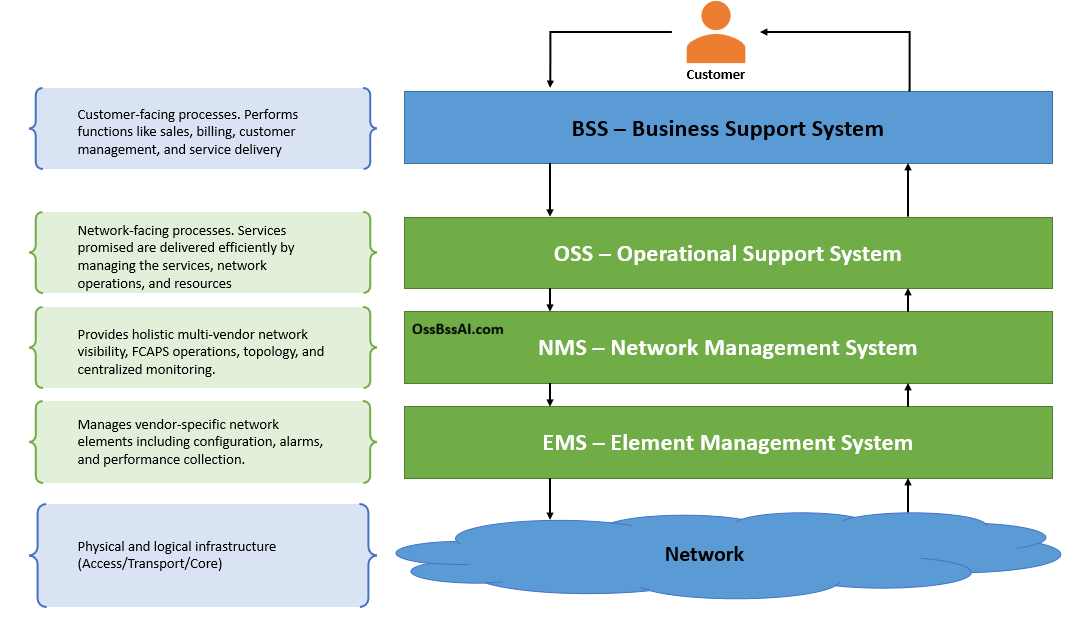
Simplified telecom management hierarchy showing the relationship between BSS, OSS, EMS, NMS, and the underlying network infrastructure.
Element Management System - Manages vendor-specific network domains or element families
Network Management System - Manages multi-vendor, multi-domain
Normalizes, enriches, filters data from EMS
Software on NE that responds to management queries
eTOM Process Flow for Service Fulfillment
| eTOM Operations Area | OSS Function | Systems Involved |
|---|---|---|
| Fulfillment | Service Fulfillment | OMS, Provisioning, Activation, Inventory |
| Assurance | Service Assurance | FMS, PM, SLA Manager, Trouble Ticket |
| Operations Support & Readiness | Resource Management | Configuration, Backup, Reconciliation |
Service Assurance: Keeping Services Running
Fault Management (FMS)
Proactive: Prevention before impact
Reactive: Rapid repair after failure
Goal: Minimize MTTR
Performance Management (PM)
Monitors KPIs: latency, jitter, packet loss, PRB utilization, throughput
Threshold-based alerting
SLA Management
Ensures 99.99% uptime, tracks penalties for violations
Customer QoS commitment
Trouble Ticket Mgmt
Customer TT: User-reported issues
Network TT: System-generated from NE alarms
Proactive = Prevent outage | Reactive = Minimize MTTR (Mean Time To Repair)
Customer Trouble Ticket
- Triggered by end-user complaint
- Entered via call center, portal, or email
- Example: "No internet at home"
- SLA clock starts at ticket creation
Network Trouble Ticket
- Auto-generated from NE alarm
- Correlated with other alarms
- Example: "Router interface down"
- May auto-create customer TT if service-affecting
Key Performance Metrics
L2C (Lead to Cash)
Order → First Bill
Consumer: Hours | Enterprise: Days
Service Fulfillment Time
MTTR / T2R
Fault → Resolution
Critical: <4h | Major: <8h
Mean Time To Repair / Restore
Service Availability
99.999% SLA
~5.26 minutes downtime/year
First Time Right
Order Accuracy
Target: >95% automated
Commercial OSS Products
| Vendor | Fulfillment | Assurance | Inventory | Orchestration |
|---|---|---|---|---|
| Nokia | NetAct Provisioning | NetAct FMS/PMS | NetAct Inventory | NetAct Orchestrator |
| Ericsson | ENM Provisioning | ENM Assurance | Granite Inventory | Ericsson Orchestrator |
| Huawei | U2020 Provisioning | U2020 FMS/PMS | iManager U2000 | CloudEdge Orchestrator |
| Amdocs | Service Fulfillment | Assurance Suite | Network Inventory | NFV Orchestration |
| Netcracker | Order Management | Assurance Manager | Resource Inventory | Orchestration Suite |
| IBM | Netcool Provisioning | Netcool OI | Tivoli Inventory | Cloud Pak for AIOps |
Common Questions
Q1. What is the difference between Service Fulfillment and Service Assurance?
Fulfillment (L2C) gets services to customers - order management, provisioning, activation, inventory. Assurance (T2R) keeps them running - fault, performance, SLA, trouble tickets.
Q2. Explain L2C and T2R.
L2C = Lead to Cash - time from order to first bill (Service Fulfillment Time). T2R = Trouble to Resolve - time from fault detection to resolution (MTTR). OSS optimizes both.
Q3. What's the difference between provisioning and activation?
Provisioning decomposes orders into service configurations and creates work orders. Activation executes commands on network elements (sends to HLR, configures routers).
Q4. What is the role of Workflow Engine in OSS?
Orchestrates tasks across OMS, inventory, provisioning, activation. Reduces point-to-point interfaces, provides centralized control, supports parallel execution and roll-back.
Q5. What are the 4 sub-systems under Service Assurance?
Fault Management (FMS), Performance Management (PM), SLA Management, and Trouble Ticket Management.
Q6. What is the difference between Customer TT and Network TT?
Customer TT: User-reported via call center/portal. Network TT: Auto-generated from NE alarms. Network TT may auto-create Customer TT if service-affecting.
Q7. What is Order Decomposition?
Breaking a customer order into individual sub-orders (e.g., Voice, SMS, Data). Each sub-order has independent workflow, allowing parallel execution and better error isolation.
📌 Key Takeaways:
- OSS has two core functions: Service Fulfillment (L2C) and Service Assurance (T2R)
- Fulfillment = Order Management + Provisioning + Activation + Inventory + Workflow
- Assurance = Fault Management + Performance Management + SLA Management + Trouble Ticket Mgmt
- Service Fulfillment Time = Time from order capture to first customer use
- T2R / MTTR = Time from fault detection to resolution (Service Assurance metric)
- Workflow Engine orchestrates tasks, enables parallel execution, and provides roll-back support
- NMS Architecture: UI Layer → Functional Layer (FCAPS) → EMS → Network Elements
- Inventory tracks physical/logical network assets AND service instances with customer associations